We use Google Analytics to understand which pages help players. No names, emails or match footage are ever sent. See our privacy notice.

Film it right, once.
Get these four things right and the AI sees everything. Get them wrong and it's guessing — same as you.

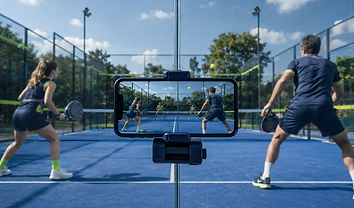
Phone sideways, clamped behind the middle of the back glass. All four players and both back glasses in frame.

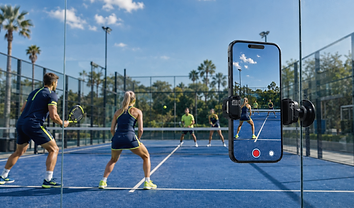
Portrait crops the tramlines and half the court. The AI loses the players it needs to see to judge your positioning.
Behind the glass, centre court
Phone landscape, directly behind the middle of your back glass. Head height or higher — a metre up changes everything. Balustrade, fence post or a £15 clamp mount all work.
Whole court in frame
Use the 0.5× wide lens. Check all four players are visible — including you at the back of your own court. If you can see both back glasses, you're set.
1080p is plenty
No need for 4K — it just eats your storage. 1080p, standard frame rate. A 90-minute match fits comfortably. Charge your phone; bring a battery pack for long sessions.
One match = one video
Stop the recording between matches. Playing again? Start a fresh video. Different matches in one file confuse the analysis.

The Limpet holds your phone at the right height, every match.
No balustrade, no clamp, no tripod in the way. Twist-lock it to the glass behind the baseline, snap the phone on, and the framing is the same match after match.
See the Limpet · £29“I'm filming this match so an app can analyse my game — all good?”
Tell all four players the match is being analysed. It's polite and it's required. The footage is never public: it produces a private report for the player who filmed it, and anyone in the match can ask for it to be deleted at any time via the report link or hello@padexa.ai. Deletion requests are actioned within 30 days.